Architectures & Tiers v0.0.12
Klio employs a multi-tiered architecture designed to balance performance, resilience, and cost. This approach separates immediate, high-speed backup and recovery operations from long-term archival and disaster recovery (DR) needs. The architecture is built around three distinct storage tiers, each serving a specific purpose in the data lifecycle.
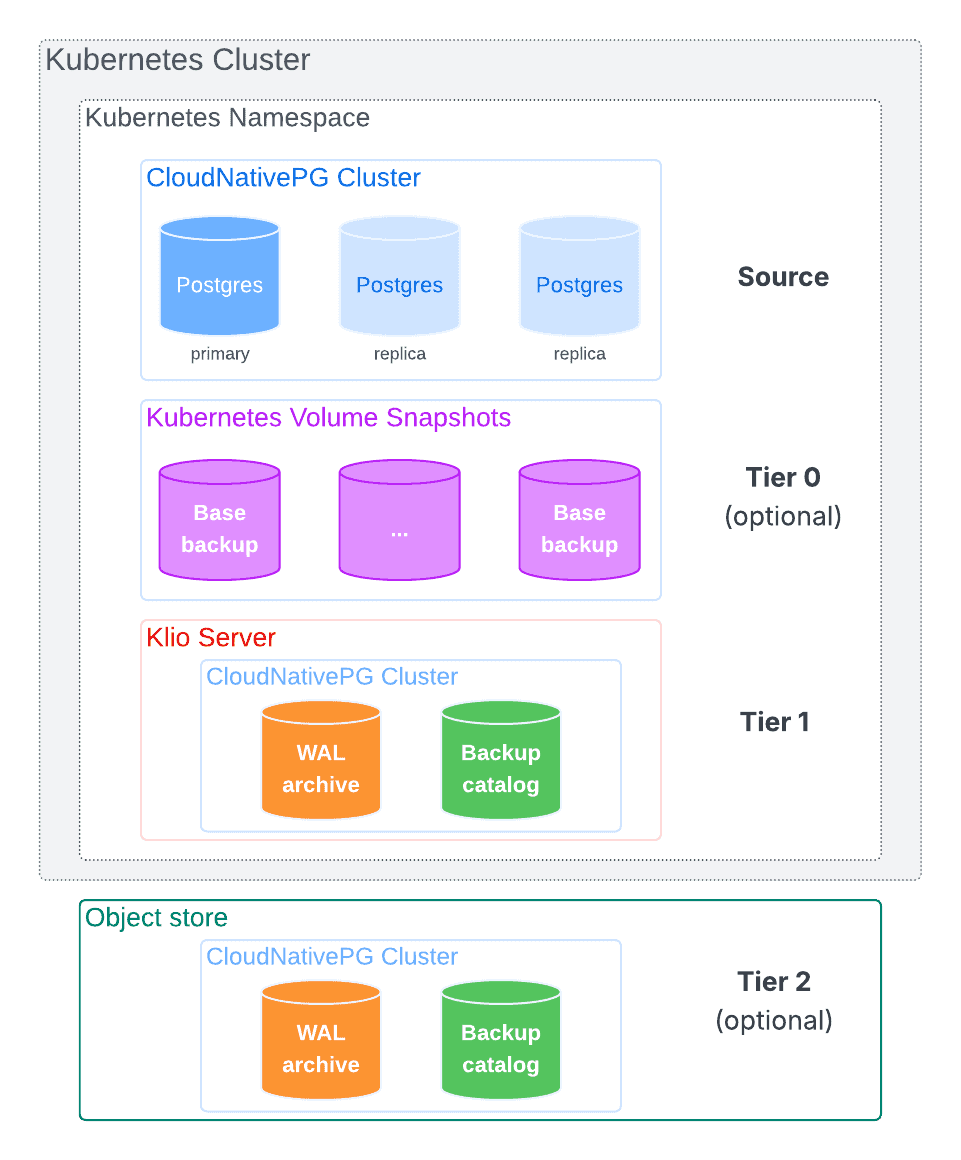
Tier 0: Volume Snapshots
Note
Tier 0 is part of our long-term vision and will be introduced in a future release.
Tier 0 leverages Kubernetes Volume Snapshots, if supported by the
underlying storage class. It consists of instantaneous, point-in-time snapshots
of all volumes used by the PostgreSQL cluster, including the PGDATA directory
and any tablespaces.
This tier is not intended for long-term storage but acts as the initial source for a base backup. By reading from a static snapshot, Klio avoids impacting the performance of the running database. From a disaster recovery perspective, these snapshots are often considered "ephemeral," as most local storage solutions keep them within the same disks, unlike some cloud providers or storage classes that allow them to be archived to object storage. Volume snapshot objects reside in the same Kubernetes namespace of a PostgreSQL cluster.
Klio coordinates the creation of the snapshot as supported by CloudNativePG and then uses it to asynchronously offload the base backup data to Tier 1. Klio also manages retention policies for volume snapshots objects for a given PostgreSQL cluster.
Tier 1: Primary Storage (The Klio Server)
Tier 1 is the core operational tier, also referred to as the Main Tier or Klio Server. It's designed for speed and provides immediate access to all necessary backup artifacts for most recovery scenarios.
This tier consists of a local Persistent Volume (PV) deployed by the Klio Server. It can be located in the same namespace as the PostgreSQL cluster or in a different one within the same Kubernetes cluster (see the "Tier 1 Architectures" section below).
Its purpose is to store the WAL archive and the catalog of physical base backups. Its high-throughput, low-latency nature is optimized for several key tasks:
- Receiving a continuous stream of WAL files directly from the PostgreSQL primary.
- Storing base backups created from the primary or offloaded from Tier 0.
- Serving as the source for asynchronously replicating data to Tier 2.
- Managing retention policies for all tiers.
Tier 1 Architectures
Klio supports several flexible deployment architectures for its Tier 1 storage.
On the physical layer, it is recommended that both compute and, most importantly, storage are separate from the PostgreSQL clusters.
Warning
Placing Tier 1 on the same nodes and storage as the PostgreSQL clusters severely impacts the business continuity objectives of your organization.
On the logical layer, a Klio Server can reside in the same namespace as the PostgreSQL cluster(s) it manages or in a separate, dedicated namespace.
When choosing an architecture, it's important to consider security and tenancy. PostgreSQL clusters managed by a single Klio Server share the same master encryption key. For this reason, it's recommended to use separate Klio Servers for clusters that serve different tenants or have distinct security requirements.
Clusters and Klio Server in the Same Namespace
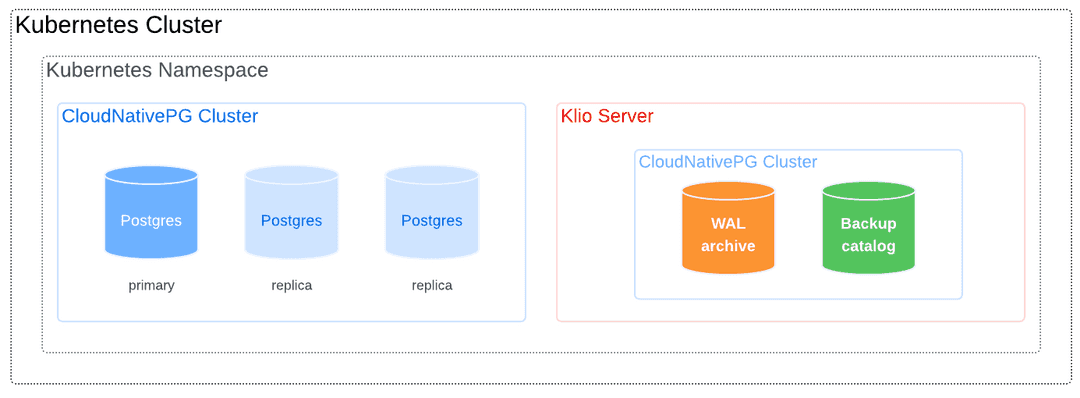
The simplest deployment places the Klio Server in the same namespace as the PostgreSQL cluster(s).
This can be a dedicated 1:1 mapping (one Klio Server per cluster):
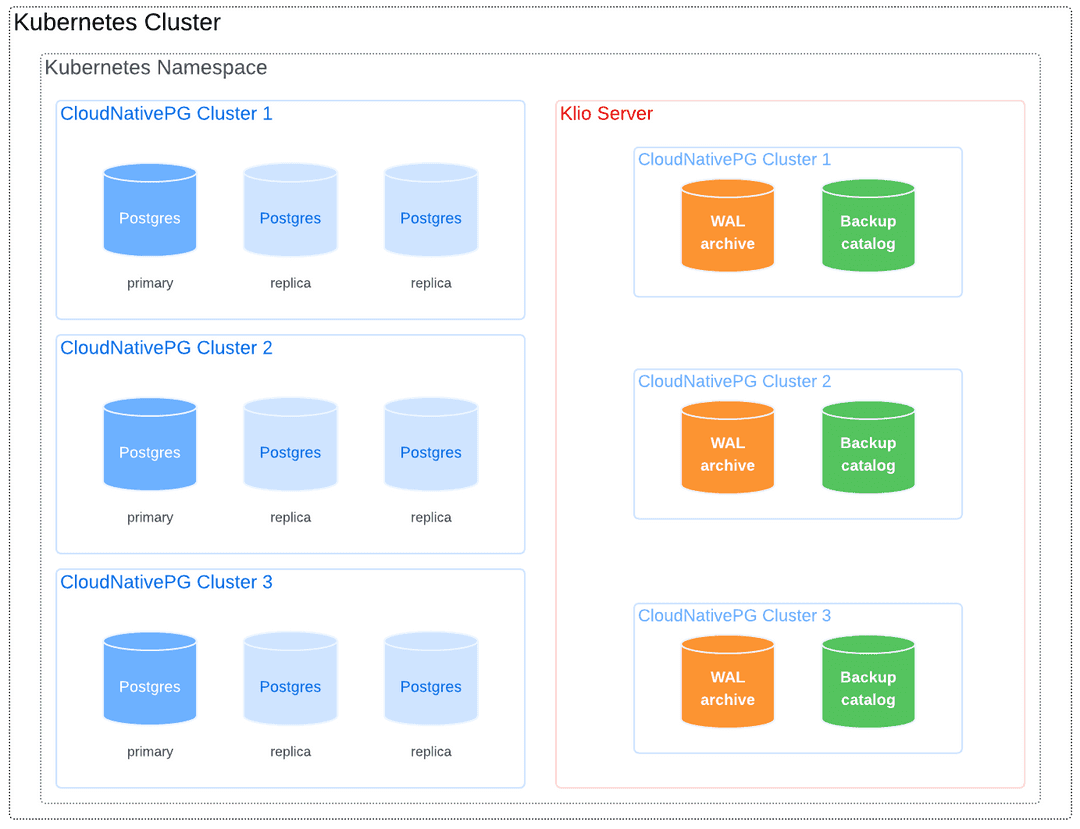
Or a shared N:1 mapping where one server manages all clusters in the namespace.
Clusters and Klio Server in Different Namespaces
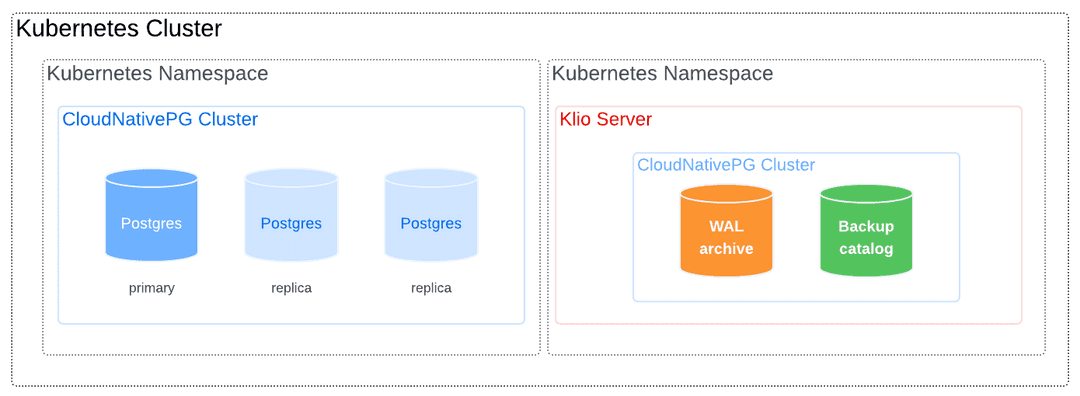
For greater isolation or centralized management, the Klio Server can be deployed in a namespace separate from the PostgreSQL clusters it protects.
The following diagram shows a PostgreSQL cluster being backed up by a Klio Server in another namespace:
This model also allows a central Klio Server to manage clusters that reside in different namespaces, as shown below:
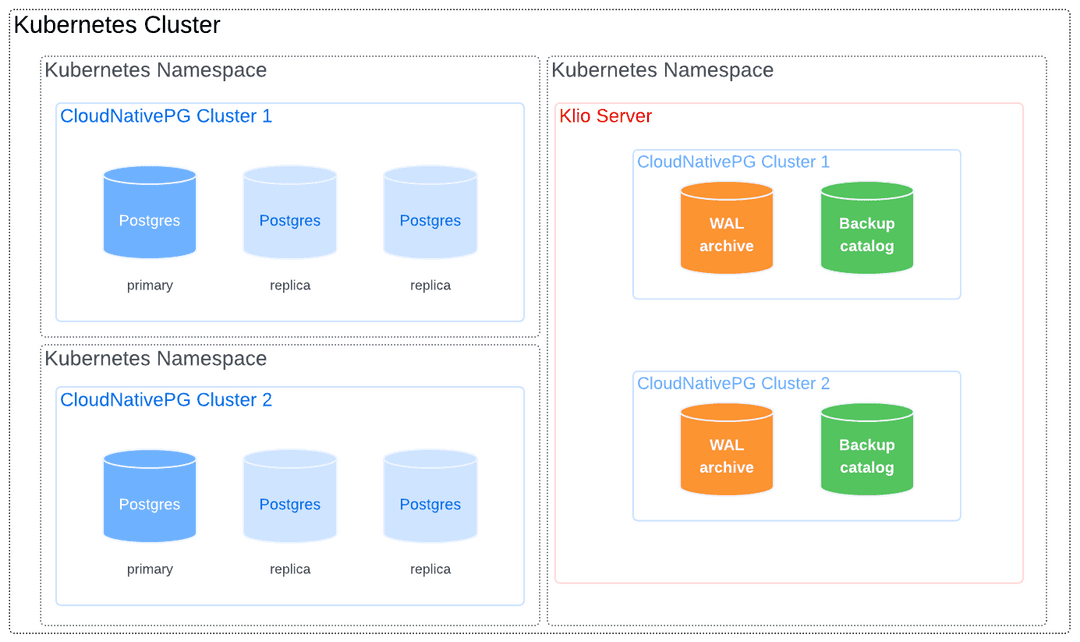
Reserving Nodes for Klio Workloads
For dedicated performance and resource isolation, you can reserve specific worker nodes for Klio pods using Kubernetes taints and tolerations.
Taint the Node: Apply a taint to the desired node. This prevents most pods from being scheduled on it.
kubectl taint node <NODE-NAME> node-role.kubernetes.io/klio=:NoSchedule
Add Toleration to Klio Server: Add the corresponding toleration to your Klio
Serverresource, adding it to.spec.template. This allows the Klio Server to be scheduled on the tainted node.# In your Server resource definition spec: template: spec: containers: [] tolerations: - key: "node-role.kubernetes.io/klio" operator: "Exists" effect: "NoSchedule"
Tier 2: Secondary Storage (Object Storage)
Tier 2 provides durable, long-term storage for robust disaster recovery (DR) strategies. It's physically and logically separate from the primary Kubernetes cluster and typically consists of an external object storage system, such as Amazon S3, Google Cloud Storage, or Azure Blob Storage. Storing backups off-site ensures geographical redundancy, protecting data against a full cluster or site failure.
Klio asynchronously relays both base backups and WAL files from Tier 1 to Tier 2. This decoupling ensures that primary backup and recovery operations in Tier 1 are not directly affected by the latency or availability of the remote object storage.
Additionally, Tier 2 can serve as a read-only fallback source. In a distributed CloudNativePG topology, this allows a Klio server at a secondary site to use the shared Tier 2 storage to bootstrap a new cluster, enhancing DR capabilities.
Restoring from Tier 2
When a backup is requested for restore, Klio will first look for it in Tier 1. If the backup is not found in Tier 1, Klio will automatically check Tier 2. This fallback mechanism ensures that backups that have been migrated to Tier 2 are still accessible for restore operations.
When Tier 2 is enabled and a backup exists in both tiers, Tier 1 takes precedence as restore from it will be faster.
Read-Only Server Mode
The Klio server supports read-only mode (mode: read-only), which serves
backups and WAL files from Tier 2 object storage without accepting write
operations. This mode is designed for disaster recovery scenarios where you
need restore capabilities without the cost of local storage or the risk of
accepting new backups.
Read-only servers are particularly useful for CloudNativePG Replica Clusters in secondary regions or datacenters. Multiple read-only servers can restore from a single S3 bucket populated by one primary server.
In read-only mode, all read and restore operations from Tier 2 function normally, while write operations (backup creation, WAL streaming, retention policies) are rejected.
See the Configuring Read-Only Mode section for configuration examples.
Planning Your Backup Strategy
When planning your backup strategy with Klio, Tier 1 is the most critical layer to define architecturally. You have several options, ranging from running Klio servers on any worker node using your cluster's primary storage solution, to dedicating a single worker node with local storage for a centralized Klio server.
Tier 0 capabilities are determined by the underlying Kubernetes
StorageClass. Klio is particularly valuable when using local storage
solutions (such as LVM with TopoLVM or OpenEBS), as it can offload volume
snapshot backups to Tier 1, freeing up high-performance local disk space via
retention policies.
Tier 2 is often determined by your organization's infrastructure teams, who have likely already selected one or more standard object storage solutions for long-term archival.